Note
Access to this page requires authorization. You can try signing in or changing directories.
Access to this page requires authorization. You can try changing directories.
Note
This feature is currently in public preview. This preview is provided without a service-level agreement, and isn't recommended for production workloads. Certain features might not be supported or might have constrained capabilities. For more information, see Supplemental Terms of Use for Microsoft Azure Previews.
In this tutorial step, you query your graph by using GQL (Graph Query Language) in the code editor. GQL provides powerful querying capabilities for complex graph patterns and analysis.
Switch to code editor mode
Follow these steps to switch to the code editor and start querying your graph by using GQL:
Go to your graph's home page.
Select Code editor from the top menu.
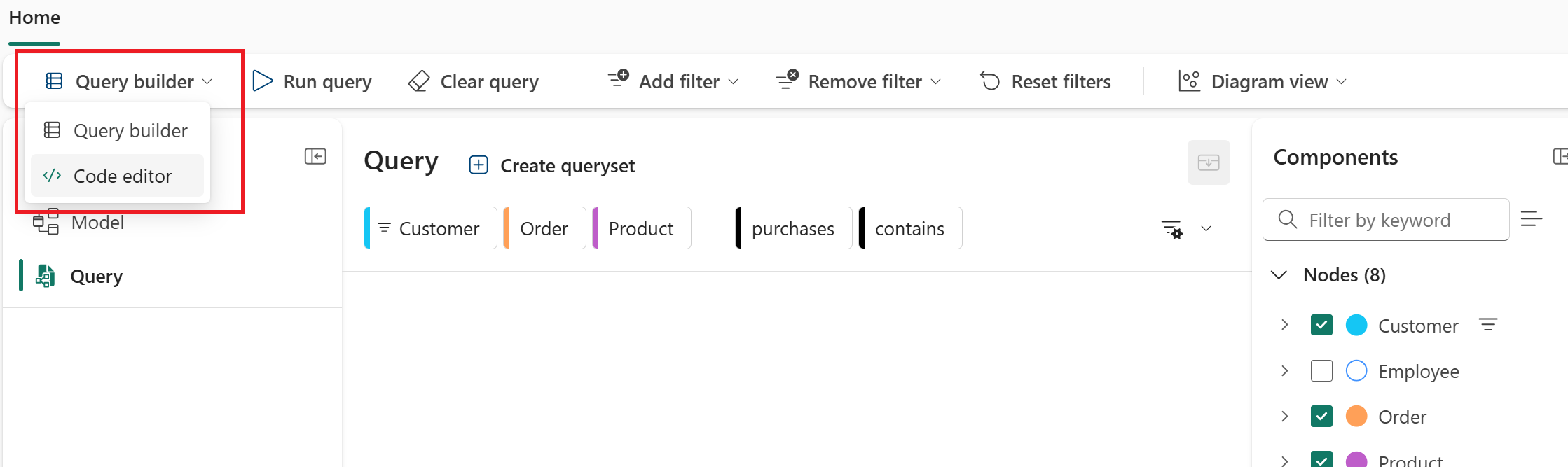
Run a basic query
Enter a GQL query into the input field. For example, count all orders:
MATCH (n:`Order`) RETURN count(n) AS num_ordersSelect Run query to execute the query.
This query finds all nodes with the Order label, counts them, and returns the total as num_orders. It's a simple way to confirm your graph has data. The following image shows the result of the query:

Recreate the query builder query in GQL
In the previous tutorial step, you used the query builder to find what products a specific customer purchased. Here's the same query written in GQL:
MATCH (c:Customer)-[:purchases]->(o:`Order`)-[:`contains`]->(p:`Product`)
FILTER c.fullName = 'Carla Adams'
RETURN c.fullName, o, p.productName
This query:
- Matches the pattern Customer → purchases → Order → contains → Product
- Filters for the customer named "Carla Adams"
- Returns the customer's full name, order details, and product names
The following image shows the result of the query (only a portion of the returned data is shown).

Run a complex query
You can run more complex queries that combine matching graph patterns, filtering, aggregation, sorting, and limiting:
MATCH (v:Vendor)-[:produces]->(p:`Product`)->(sc:`ProductSubcategory`)->(c:`ProductCategory`),
      (o:`Order`)-[:`contains`]->(p)
FILTER c.subCategoryName = 'Touring Bikes'
LET vendorName = v.vendorName, subCategoryName = sc.subCategoryName
RETURN vendorName, subCategoryName, count(DISTINCT p) AS num_products, count(o) AS num_orders
GROUP BY vendorName, subCategoryName
ORDER BY num_orders DESC
LIMIT 5
This query:
- Matches a pattern that connects vendors to products through the supply chain, and orders to products.
- Filters for products in the 'Touring Bikes' category.
- Defines variables for vendor and subcategory names.
- Returns the vendor name, subcategory name, distinct product count, and order count.
- Groups results by vendor and subcategory.
- Orders results by order count in descending order.
- Limits results to the top 5.
In summary, it shows the top five vendors supplying products in the 'Touring Bikes' category, along with how many products they supply and how many orders those products have.

Related content
For more information about GQL language support, see: